
Ride A Pet Egg Locations: Routes, Index Labels and Pickup
Find a dated egg search route, read the retained Index map/luck labels accurately, and separate pickup, basket capacity and unknown spawn timers.
FAQ
Where should I search for eggs?
Does x1 In Map prove only one egg exists on the server?
When do eggs restock or break?
Where should I search first?
Choose the route for the object you want. Start with the 12-checkpoint Blackhole/Cherub trail for waterfall cliffs, cave interiors, island, desert and giant tree. For the striped shell, compare the grassland and rock-ledge picture on the Easter egg page. The map guide connects these landmarks with a return to your ranch.
Reviewed 4 November 2026. The images below are retained from this article’s September 2026 version. Later official Fuse, Halloween, Parkour, Heaven and Void listings establish that more updates followed, but do not verify a new complete map or egg pool. No current-client run was performed for this revision.
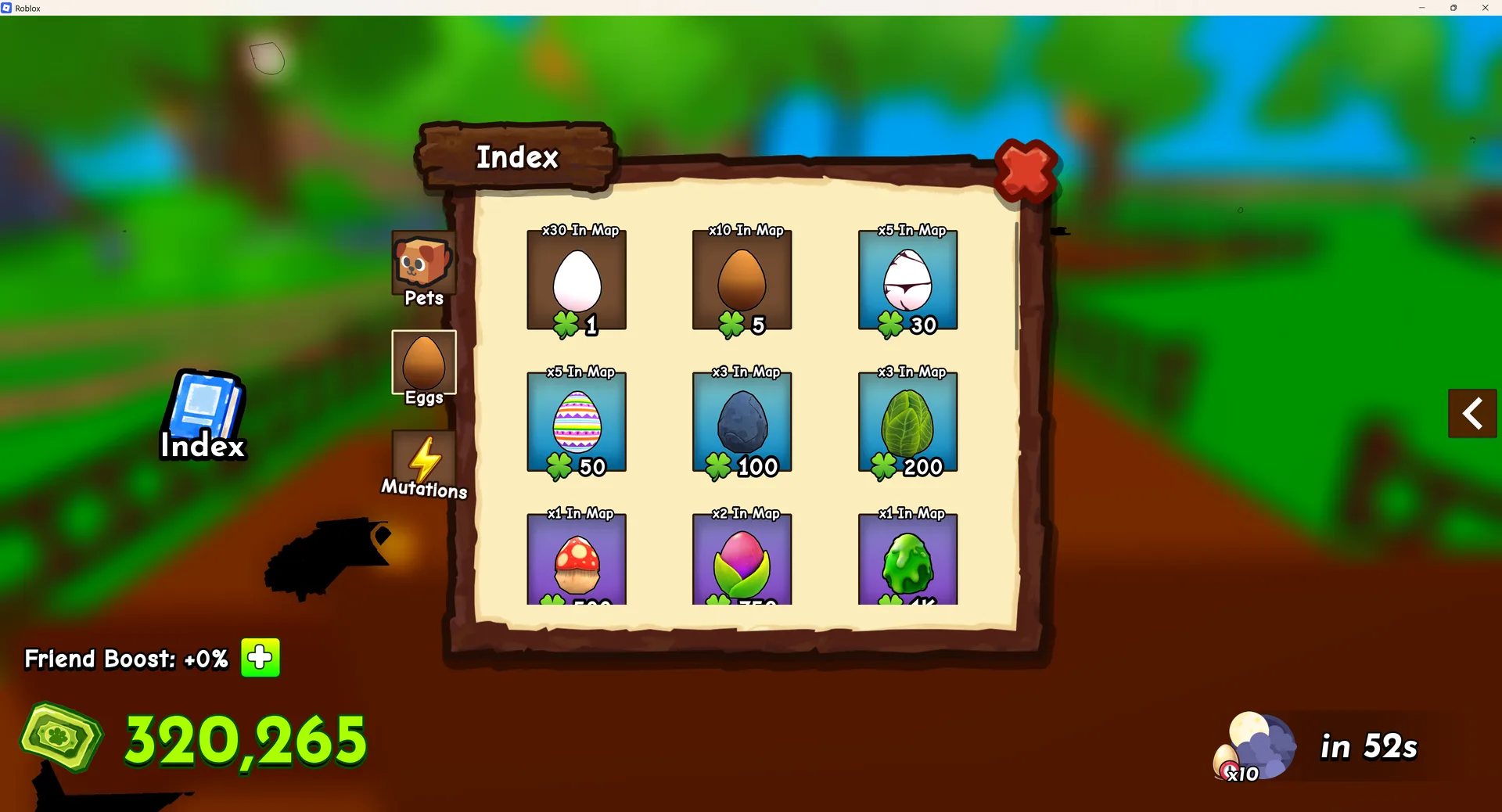
How does egg spawning work?
The image gives a useful historical label reference, not a complete current spawn specification:
| Visible shell/card | Retained “In Map” label | Visible clover value |
|---|---|---|
| White shell | x30 | 1 |
| Brown shell | x10 | 5 |
| White shell with dark pattern | x5 | 30 |
| Pastel-striped shell | x5 | 50 |
| Dark stone-like shell | x3 | 100 |
| Green leaf-like shell | x3 | 200 |
| Three partly cropped lower cards | x1, x2, x1 | Bottom values partly obscured |
The lower row is cropped; this guide does not complete its numbers from guesswork. The picture shows nine visible cards, not proof of nine total current egg types. A map-count label is not a hatch chance. A clover value is not a per-pet probability. The screenshot also cannot establish a permanent server cap or distance-based rarity rings.
The retained Blackhole announcement shows one restock and spawn message together. That is a reason to notice the actual signal, not a guarantee that every restock yields an announced egg. A radar/track feature may help if its current description covers your target; read what it detects before paying, rather than assuming every tier finds every egg. See the existing radar reference with that version boundary.
Which eggs should I hunt?
Choose by an observable goal instead of treating the highest old clover number as guaranteed profit:
| Your goal | Useful route or decision |
|---|---|
| Learn pickup and return | Choose a nearby visible egg and practise the current interaction, then return to an available nest |
| Search for Blackhole or Cherub | Use the numbered landmark trail and mark each stop searched, unreachable or found |
| Identify the striped shell | Compare its pattern and rock-ledge setting with the retained Easter-style picture; confirm its displayed name |
| Hatch a particular pet | Start with its documented route or current printed hatch table; do not infer the pet pool from a luck label |
| Complete an Index goal | Confirm the relevant entry and actual progress after the action; use the Index guide |
For a short practice loop, pick one recognizable nearby landmark and return to your plot before extending the route. That teaches the return path without assuming a fixed spawn interval or universal travel time.
What happens after I grab an egg?
The retained picture shows a White Egg, clover 1, being carried above the character at a ranch, with an E / Place prompt. It supports that pictured handling interaction. It does not establish every control binding, basket upgrade or nest count today.
- Read the object’s name and Pick Up prompt before collecting it.
- Check the basket/space indicator your game actually shows. If collection is refused, resolve that displayed capacity condition before running to more stops.
- Return along the path you learned to your ranch and an available nest. Use the current Place interaction; E is the binding in the old keyboard screenshot.
- Confirm the egg is placed and observe the actual hatch/result prompt. A successful pickup, a placed egg and a new Index registration are different outcomes.
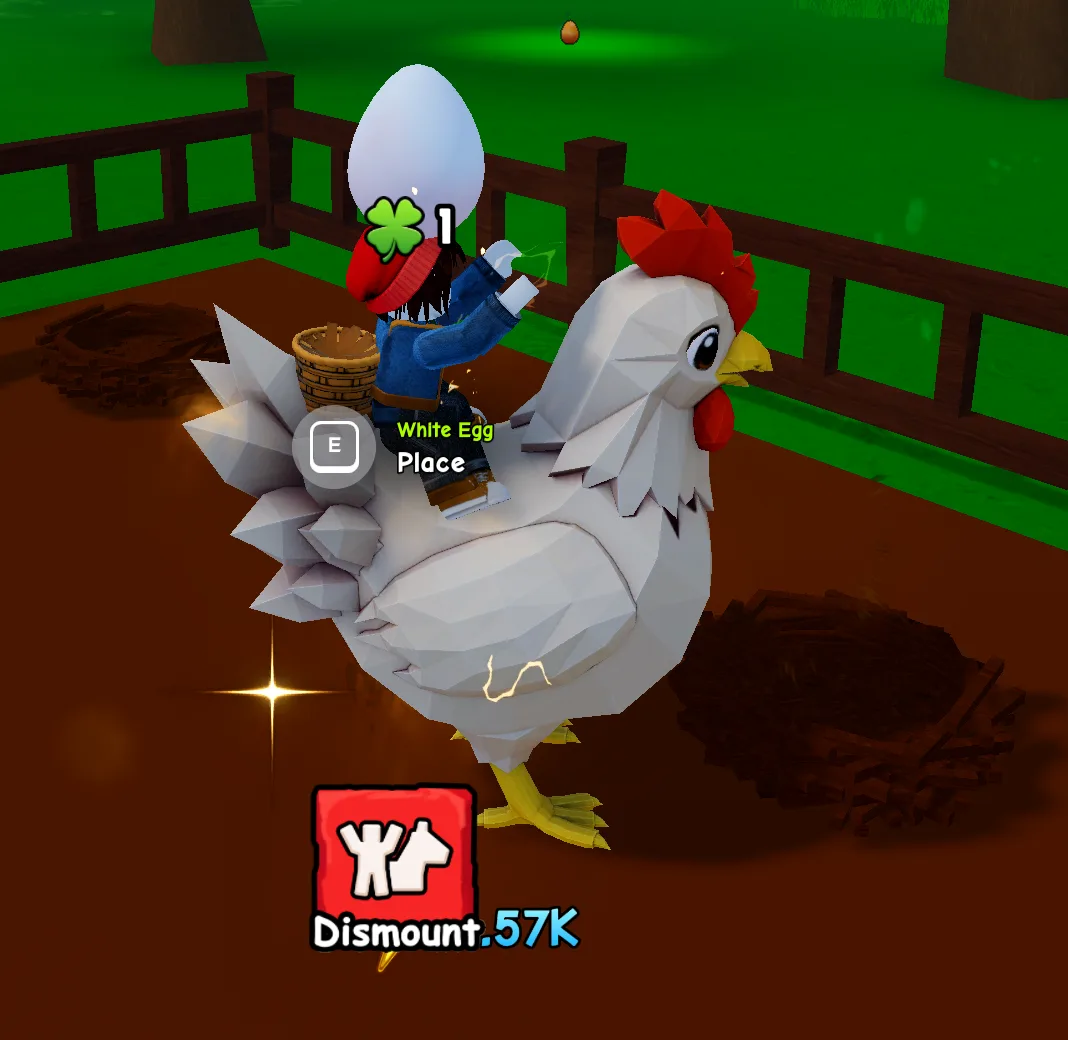
No universal timer saying every carried egg breaks after sixty seconds was verified. The old screen’s countdowns do not by themselves identify an expiry mechanic. Likewise, this page does not prescribe selling a pet or buying an upgrade to solve capacity without the current prompt. Pets overview helps identify a result; hatch luck is a separate system from the displayed map labels.
What if the route, pickup or hatch differs?
- No egg at a matching landmark: mark it searched and continue. The reference is not live stock.
- Cannot reach the pictured area: mark it unreachable, compare the entrance image and use an accessible leg. The flight shown in the old recording does not establish a ground route.
- Pickup or Place fails: record the exact prompt, egg name and basket/nest state. Do not assume a timer or capacity from a different player’s screenshot.
- Hatch outcome differs from a guide: compare the actual egg identity and any displayed pet odds. Old clover values do not prove a per-pet table.
For a correction, send the relevant picture/checkpoint, current screenshot and event/version through Contact. Use the official Roblox experience’s linked community for game support.
Sources and scope
- Retained Index picture and carry/Place picture, from the September 2026 article: direct visual observations, exact capture build unverified.
- Nay_Kows’ route recording: old landmark guidance for the linked checklist.
- Official event listing, reviewed 4 November 2026: dated update context, not a current spawn/cap/probability specification.
Related Articles
mechanics
Ride A Pet Hatch Luck: The Ranch Upgrade Board
Hatch Luck is the green upgrade board on your own ranch in Ride A Pet: what its numbers mean, how the five-step bar works, and why a rebirth wipes it.
eggs
Ride A Pet: Blackhole & Cherub Egg Locations, 12 Checkpoints
Follow the retained Blackhole and Cherub egg route through 12 landmark checkpoints, with screenshots, source dates and help when the map differs.
eggs
Ride A Pet Blackhole Egg: Identification and Search Route
Recognize the Blackhole Egg alert and photographed pickup, follow the dated landmark route, and separate 100B luck text from unknown hatch odds.
Was this helpful?
Thanks for the feedback!